 blog
blogThe Ultimate Guide to Sticker Mockups: From Size Charts to Pro Tips
Table of Contents
- What is a Sticker Mockup and Why Do You Need It?
- The Ultimate Sticker Size Guide
- How to Turn Art Into Stickers (Step-by-Step Tutorial)
- Creative Sticker Ideas and Best Practices
- 4 Professional Tips for Manufacturing and Printing
- Conclusion
- Frequently Asked Questions (FAQs)
Introduction
A sticker mockup is a digital representation of how your sticker design will appear on real-world surfaces before printing. Whether you're launching a new product, building brand identity, or creating promotional materials, understanding sticker dimensions and visualization is essential to your success. This comprehensive guide covers everything from sticker dimensions to creating stunning sticker designs free online.
What is a Sticker Mockup and Why Do You Need It?
A sticker mockup is a high-fidelity digital preview that demonstrates exactly how your design will behave in a physical environment. Unlike a flat 2D image, a mockup accounts for lighting, texture, and perspective. For example, if you are designing a logo for a coffee shop, a mockup can show you if the text remains legible when wrapped around a disposable cup.
Why is this critical for your workflow?
- Visual Validation: It helps you spot design flaws, such as low contrast or illegible text, before manufacturing begins.
- Marketing Material: High-quality mockups serve as professional product photos for Etsy, Shopify, or social media, increasing perceived value without the cost of a photoshoot.
- Client Approval: If you are a freelancer, presenting a sticker design on a realistic object helps clients "get it" faster than showing a raw PNG file.
The Ultimate Sticker Size Guide
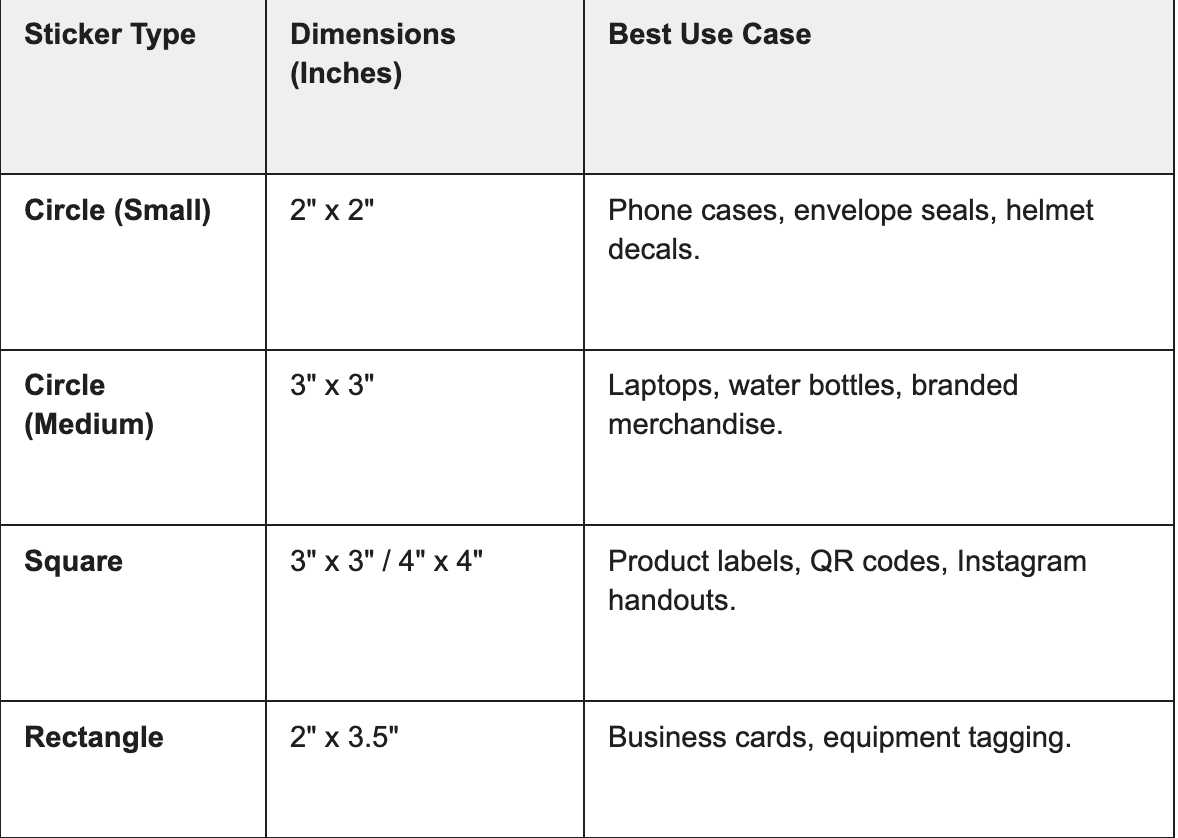
Choosing the correct size is just as important as the artwork itself. A sticker that is too small gets lost; one that is too large can be overwhelming. Below is a breakdown of standard dimensions to help you plan your sticker designs free of sizing errors.
Standard Small Stickers
Small stickers are the most versatile category. Ranging typically from 2 to 4 inches, they are perfect for maximizing space on a "sticker bomb" laptop or filling gaps in a journal.
Bumper Sticker Dimensions
1.Standard Bumper Sticker Size
The classic bumper sticker dimensions most manufacturers produce is 11.5 × 3 inches (29.2 × 7.62 centimeters or 1104 × 288 pixels). This size bumper sticker has become the industry standard because it fits perfectly across most vehicle bumpers without overwhelming the design space.
Moreover, bumper sticker applications vary significantly by vehicle type. Here's the comprehensive breakdown:
Vehicle-Specific Bumper Sticker Sizes:
- Sedans: 10 × 3 inches (ideal proportions for medium-sized bumpers)
- Hatchbacks: 8 × 2.5 inches (compact design for smaller bumpers)
- Trucks & SUVs: 11.5 × 3 inches or 15 × 4 inches (larger surfaces accommodate bigger designs)
- RVs: 14 × 4 inches (maximizes visibility on expansive surfaces)
- Vans: 10 × 3 inches (balanced sizing for commercial vehicles)
- Trailers: 8-12 inches length × 2-4 inches height (variable sizing based on trailer type)
- ATVs: 6 × 3 inches or 8 × 4 inches (rugged vehicle adaptation)
- Boats: 8-12 inches length × 3-6 inches height (marine-grade proportioning)
2.Alternative Bumper Sticker Dimensions
While 11.5 × 3 inches dominates the market, other bumper sticker size variations exist for specialized applications:
- 8 × 4 inches or 7.5 × 3.75 inches for narrow bumper spaces
- 15 × 3.75 inches for larger vehicles requiring maximum visibility
- 6 × 2.5 inches for motorcycle or small vehicle applications
How to Turn Art Into Stickers(Step-by-Step Tutorial)
Transforming your digital illustrations or photos into realistic stickers doesn't require expensive software. With the right platform, you can create stickers for free and visualize them instantly. Here is a streamlined workflow using Mockuplabs.
Step 1: Upload your sticker image
Add your sticker base or choose from free die-cut, kiss-cut, bumper or sheet templates.
Step 2:Convert to mockup
Turn the sticker into an editable surface with automatic warping and shading.
Step 3: Apply or generate designs
Upload your artwork, add text, or generate graphics with AI.
Step 4: Download your mockup
Export your sticker mockup as high-quality images or videos.
Creative Sticker Ideas and Best Practices
Inspiration for Sticker Designs
The most compelling sticker ideas emerge from understanding your audience and purpose. Here are proven sticker design categories that consistently perform well:
Popular Sticker Design Categories:
- Motivational quotes and affirmations inspiring daily action
- Brand logos and company identities establishing professional presence
- Humorous artwork and memes creating emotional connection
- Cute sticker ideas featuring animals, characters, and whimsical illustrations
- Nature-inspired designs incorporating botanical and wildlife elements
- Abstract art and geometric patterns appealing to design-forward audiences
- Personal achievements and hobby-related designs
- Social and political statements promoting causes
Cute Sticker Idea Examples
Cute sticker idea concepts resonate particularly well across demographics. Animal illustrations, character designs, and whimsical compositions create emotional appeal that drives sharing and engagement. Additionally, pastel color palettes and rounded typography enhance perceived cuteness and memorability.
Design Principles for Maximum Impact
- Simplicity: Avoid cluttered compositions—stickers benefit from clean, focused designs
- Contrast: Ensure designs remain visible at reduced sizes with strong color differentiation
- Message Clarity: Make your primary message instantly recognizable even at small dimensions
- Color Psychology: Choose colors that evoke appropriate emotional responses
- Scalability: Test your design at multiple sizes to ensure visual integrity across formats
Scale Your Sticker Business with Premium Templates
Browse over 20,000 high-quality mockups including packaging, apparel, and promotional items to elevate your brand presentation.
4 Professional Tips for Manufacturing and Printing
Creating a digital design is step one; preparing it for the physical world is step two. To ensure your sticker design looks as good in hand as it does on screen, follow these preparation best practices.
1. Resolution and File Formats
Always design at 300 DPI (Dots Per Inch). While 72 DPI looks fine on a monitor, it will look pixelated and blurry when printed. Save your final production files as PNGs with transparent backgrounds or as vector PDFs to ensure crisp edges.
2. Color Modes: RGB vs. CMYK
Screens display color using light (RGB), while printers use ink (CMYK).
- The Trap: Neon greens and bright pinks often look duller in print than on screen.
- The Fix: Convert your design workspace to CMYK mode before finalizing colors. This gives you a more accurate representation of the final print.
3. Understanding Bleed and Safe Zones
- Bleed: This is the extra background color that extends beyond the cut line (usually 0.125 inches). It ensures that if the cutting blade is slightly off, you don't end up with an ugly white sliver on the edge of your sticker.
- Safe Zone: Keep all important text and design elements at least 0.125 inches inside the cut line so they don't get chopped off.
4. Material Selection
The vibe of your sticker changes with the material.
- Vinyl: Durable, waterproof, and UV resistant. Best for bumper stickers and water bottles.
- Holographic: trendy and eye-catching, perfect for cute sticker ideas.
- Paper/Matte: Great for packaging seals or planners but not weather-resistant.
Conclusion
In conclusion, mastering sticker mockups, choosing the right sizes, and refining your designs before printing will dramatically improve every project’s impact. Thoughtful dimensions, clear visuals, and realistic previews reduce costly errors and boost conversions. With the right tools and ideas, your stickers can truly stand out anywhere.
Frequently Asked Questions (FAQs)
1. What is the standard size for a bumper sticker?
The most common size bumper sticker is 11.5 inches by 3 inches. This rectangular format is the industry standard because it fits almost every car bumper while allowing text to be large enough to read from a distance. However, oval stickers (usually 3" x 5") are also very popular for regional codes and logos.
2. How do I make high-quality stickers from my art?
To turn art into stickers, scan or create your artwork at a high resolution (at least 300 DPI). Remove the background so it is transparent. Then, use a mockup generator to preview how it looks on different materials (vinyl, paper, holographic). Finally, export the file in CMYK color mode for the best printing results.
3. Can I create sticker mockups for free?
Yes, you can make sticker online free using platforms like Mockuplabs.ai, Canva. These tools allow you to upload your design and place it on realistic photos of laptops, bottles, or cars without needing a subscription or complex software like Photoshop.
4. What are some trending sticker ideas for 2026?
Current trends include "retro-future" aesthetics (vaporwave colors), mental health affirmations, cottage-core illustrations (mushrooms, frogs, plants), and personalized pet portraits. Cute sticker idea themes involving interactive elements (like planner trackers) are also gaining popularity.