 blog
blog2026 AI Prompt Engineering Guide: Generate Brand Assets That Sell
Table of Content
- The "Commercial Quality" Gap: Why Your Prompts Are Failing
- The 8-Region Canvas Method: The Professional Framework
- The Prompt Vault: Copy, Paste, and Dominate
- From "Prompt" to "Profit": The Missing Link
- FAQs
The "Commercial Quality" Gap: Why Your Prompts Are Failing
The uncomfortable truth for most Shopify and Amazon sellers in 2026 is that they are using AI the wrong way. The average user treats an ai image generator like a search engine, firing in generic keywords and hoping for magic.
The result? Beautiful "art" that is commercially useless. You get wrong aspect ratios, messy backgrounds, and text that looks like a glitch.
Top-tier ai prompt engineers don't just "wish" for images; they understand Model-Specific Prompt Engineering (MSPE). They know that Nano Banana Pro (the engine behind the latest Gemini-powered tools) isn't just a "text to image" tool—it’s a precision rendering engine. To win in 2026, you need to speak the model's native language.
Visual Reference Library: Before we dive into the prompt architecture and ai prompt templates, explore how these models perform across different commercial categories. Seeing the output first will help you better grasp the logic behind the prompt structures below:
- Product Staging: [See Nano Banana Pro Scenarios & Use Cases]
- Brand Identity: [Browse AI-Generated Patterns & Logo Designs ]
- Full Listing Sets: [Explore Professional Product & Lifestyle Visuals]
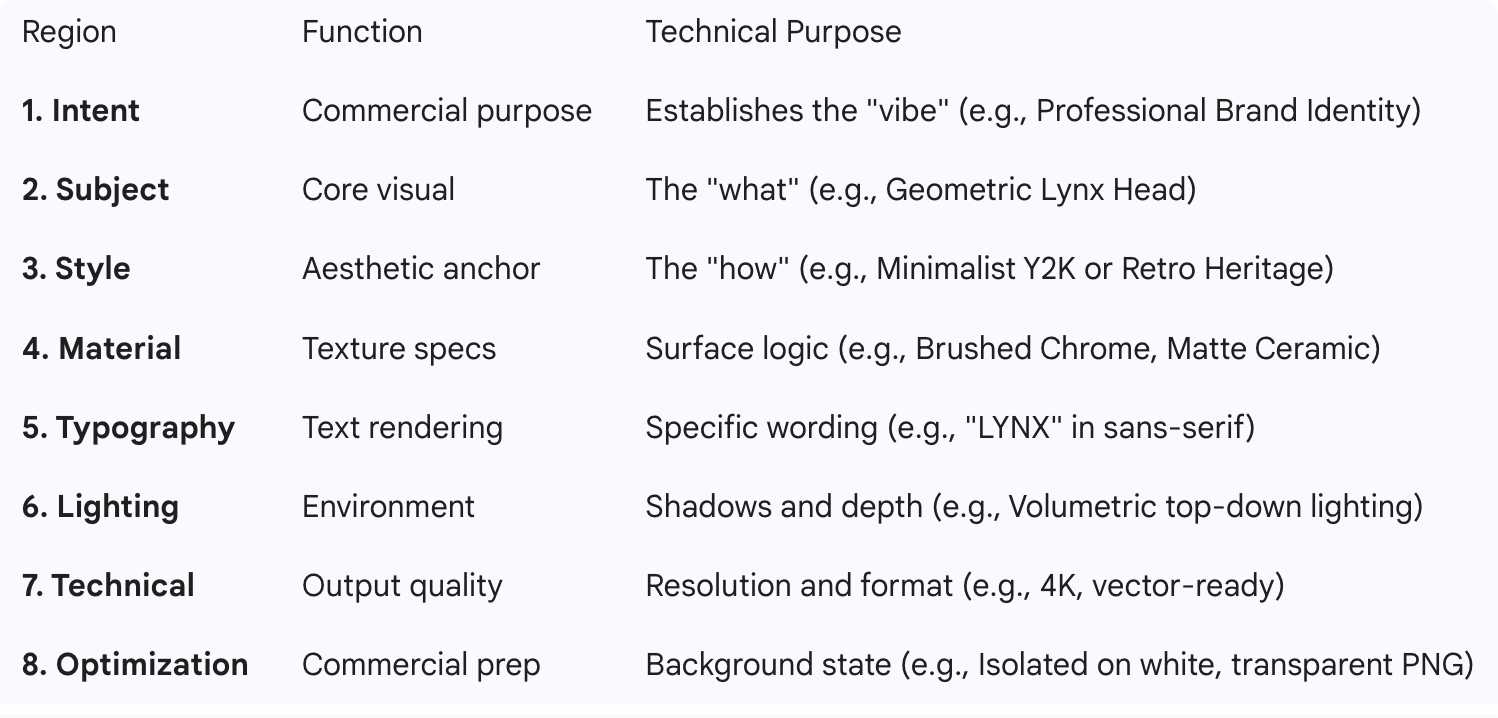
The 8-Region Canvas Method: The Professional Framework
If you want an ai logo generator with prompt accuracy that rivals a $5,000 design agency, you must use the 8-Region Canvas Method. This is the secret structure that ensures your ai photo prompt results in a clean, usable asset.
The Prompt Vault: Copy, Paste, and Dominate
Here are three ai prompt examples engineered specifically for logo and pattern generation.
1. The "Liquid Tech" Logo (Gen Z / Techwear Brands)
Prompt: Futuristic streetwear identity, sharp four-pointed star icon, crafted from liquid titanium with high-gloss reflections, "CORE" in wide-stretched futuristic font below, soft volumetric lighting, 4K resolution, isolated on pure white background, clean professional brand asset.
2. The Heritage Athletic Crest
Prompt: Professional brand logo, a fierce bald eagle profile inside a vintage shield, retro Americana style, "EST. 2026" in bold varsity typography, high-contrast navy and cream palette, 4K high resolution, clean lines, no shadows, transparent background.
3. The Editorial Product Asset (Lifestyle / Home Decor)
Prompt: Minimalist ceramic vase with organic curves, matte terracotta texture, dappled sunlight through a window creating soft shadows, cinematic atmosphere, 8K ultra-realistic, shot on 35mm lens, isolated for e-commerce catalog use.
Ready to bring these prompts to life?
Make sure to select the Nano Banana Pro model, and start experimenting. Test each prompt to see how the design details come to life and refine them for your brand.
From "Prompt" to "Profit": The Missing Link
Generating a high-quality asset with an ai image editor with prompt capabilities is only 50% of the battle. The real challenge for Shopify and Amazon sellers is visualization.
How does that "Liquid Tech" logo actually look on a premium oversized hoodie? How does that "Heritage Crest" sit on a canvas tote bag?
This is where the Value Loop closes. Once you have used the ai image prompt generator to create your 4K asset, you shouldn't waste hours in Photoshop.
The 60-Second Workflow:
- Generate: Use Mockuplabs.ai's AI Image Generator to create your brand asset using the prompts above.
- Mockup: Use Mockup Generator to generate your any product mockup and instantly drop that asset into the mockup.
- Launch: The AI automatically calculates fabric draping, lighting, and textures, giving you a professional-grade product shot ready for your Amazon listing or Shopify storefront.
FAQs
Q: Can I really get accurate text using an ai logo generator with prompt?
Yes, but only with modern models like Nano Banana Pro. Older models struggle with spelling. In 2026, the key is using quotes (e.g., "BRAND NAME") and specifying the font style (e.g., "Bold Sans-Serif").
Q: What is the best resolution for Amazon/Shopify assets?
You should always aim for 4K (4096px). Anything less will pixelate when customers use the "zoom" feature on your product images.
Q: How do I remove backgrounds from my AI-generated images?
You can add “Isolated on white” or “Transparent PNG” to your AI prompt for basic background removal. For more accurate and cleaner results, use Mockuplabs’ built-in background removal tool—it offers better precision than prompt-based methods.