With the pet accessories market projected to hit $9.97 billion by 2030, now is the perfect time to elevate your brand imagery with our high-fidelity mockups. A flat, unrealistic mockup is the fastest way to make your premium brand look cheap. To convert pet parents in 2026, you need images that capture true fabric drape, 3D curves, and breed-specific context.
This guide shows you how to ditch tedious templates and use Mockuplabs’ proprietary "Any Image Mockup" technology to transform your designs into high-converting, realistic mockups in minutes—delivering a level of precision standard AI tools can’t match.
Table of Contents
- Why Pet Bandana Mockups Drive 3x More Conversions
- Know Your Audience: How to Tailor Your Mockup Strategy
- Pet Bandana Listing Optimization: The Mockup's Role
- Tutorial: Launching Your Pet Bandana Line in 4 Simple Steps
- Conclusion: From Design to Viral Content
- FAQs: Common Pet Bandana Mockups Questions
Why Pet Bandana Mockups Drive 3x More Conversions (The "Realism" Factor)
Pet product buyers don' t just buy a pattern; they buy a lifestyle. Unlike human apparel, where fit is predictable, pet accessories are purely emotional and visual. A flat design fails to answer the buyer's #1 question: "How will this look on my dog?"
The High-Stakes Challenges of Pet Bandana Design:
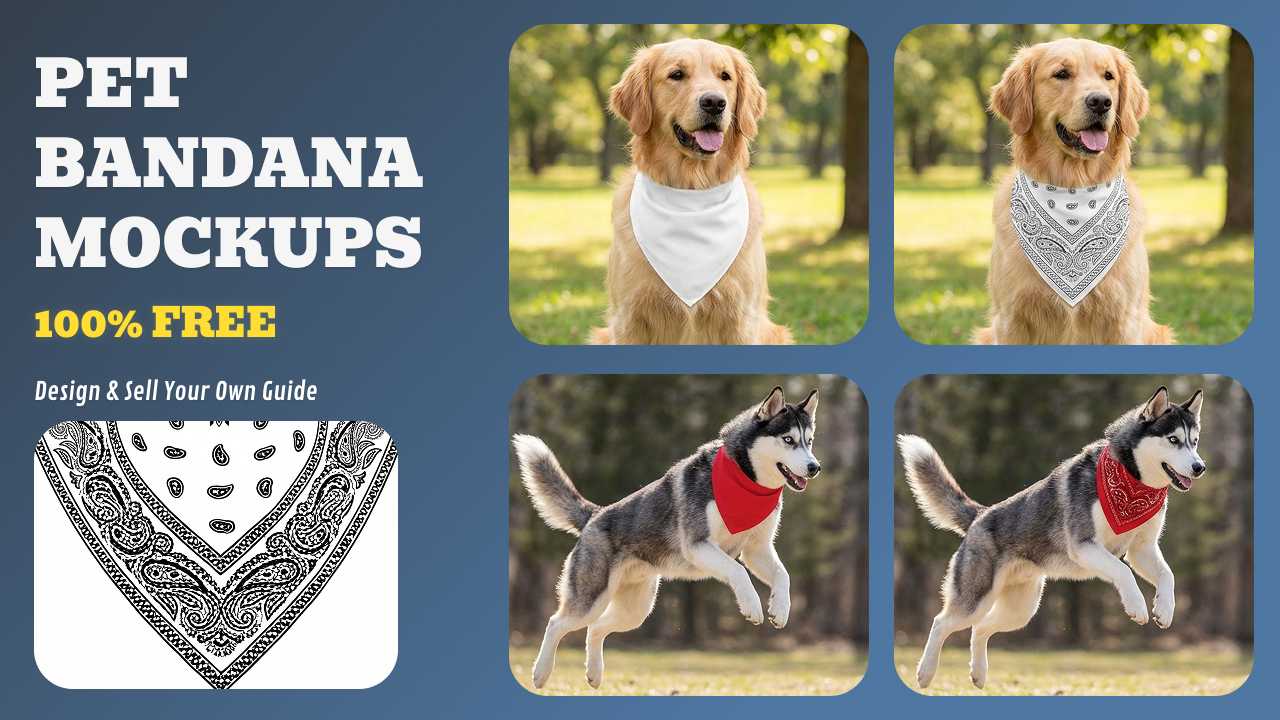
- The "Tied & Folded" Reality: A bandana is never flat when worn. It bunches, ripples, and folds. If your mockup doesn't simulate these organic fabric drapes, your design will look like a "sticker" floating on a photo—a major trust-killer for premium shoppers.
- Geometric Distortion: Design elements wrap around a dog’s neck in a cylindrical fashion. Our AI-powered Any Image technology automatically warps your text and logos to follow the curve of the animal's neck, ensuring legibility and realism.
- Breed-Specific Context: One size does not fit all. Sellers now need to show designs on different fur textures—from short-haired Frenchies to fluffy Golden Retrievers. Seeing how a design interacts with "fur shadows" is the ultimate conversion booster.
- The "Action" Perspective: Bandanas move. Using AI to generate lifestyle mockups (the dog in a park, at a cafe, or on a walk) provides the emotional context that flat-lays lack, without the $2,000 cost of a professional pet photoshoot.
- Managing Customization Expectations: For personalized "Name" bandanas, buyers are terrified of typos or bad placement. High-fidelity mockups provide a "What You See Is What You Get" guarantee, drastically reducing returns and customer service tickets.
Know Your Audience: How to Tailor Your Mockup Strategy
Different buyers have different triggers. To maximize your 2026 sales, your mockups should speak directly to these three core segments:
1. The Professional: Pet Business Owners
- Who they are: Groomers, trainers, and daycare facilities.
- The Motivation: Branding and professional identity.
- Mockup Strategy: Focus on Logo Consistency. Use multiple dog breeds and various angles (front, side, and back) to prove that their business logo remains visible and legible during pet activity.
- Conversion Key: Show "Bulk Uniformity"—a shot of 3 different breeds all wearing the same branded bandana.
2. The Gifter: Individual Pet Owners
- Who they are: Primarily female, shopping for birthdays, holidays, or "Self-treats."
- The Motivation: Extreme cuteness and emotional personalization.
- Mockup Strategy: Focus on Breed & Lifestyle Context. Since these buyers shop with their hearts, use AI-generated backgrounds (cafes, parks) and match the dog breed in the mockup to the buyer’s demographic.
- Conversion Key: Photorealistic "Action Shots" that make them say, "That looks just like my dog!"
3. The Scaler: Resellers & POD Sellers
- Who they are: Entrepreneurs and volume sellers on Etsy/Amazon.
- The Motivation: Efficiency and rapid SKU testing.
- Mockup Strategy: Focus on speed & variety. These sellers need 10+ high-quality variants in minutes to keep up with trends (like Valentine’s or Super Bowl).
- Conversion Key: Consistent lighting and shadow mapping across all designs to build a cohesive, trust-worthy brand gallery.
Pet Bandana Listing Optimization: The Mockup's Role
A great mockup grabs attention, but your listing strategy closes the deal. Use this framework to align your visuals with marketplace SEO (Etsy/Amazon):
1. Title Optimization(Etsy/Amazon Best Practices)
Instead of: "Dog Bandana - Custom Pet Scarf"
Use: "Custom Dog Bandana with Name - Personalized Pet Collar Scarf, Reversible Slip-On Design (Small, Medium, Large)"
Why this works: Includes keywords (custom, personalized, pet, bandana), design features (slip-on, reversible), and size options. The mockup should show at least two of these features (e.g., personalized text + reversible pattern flip).
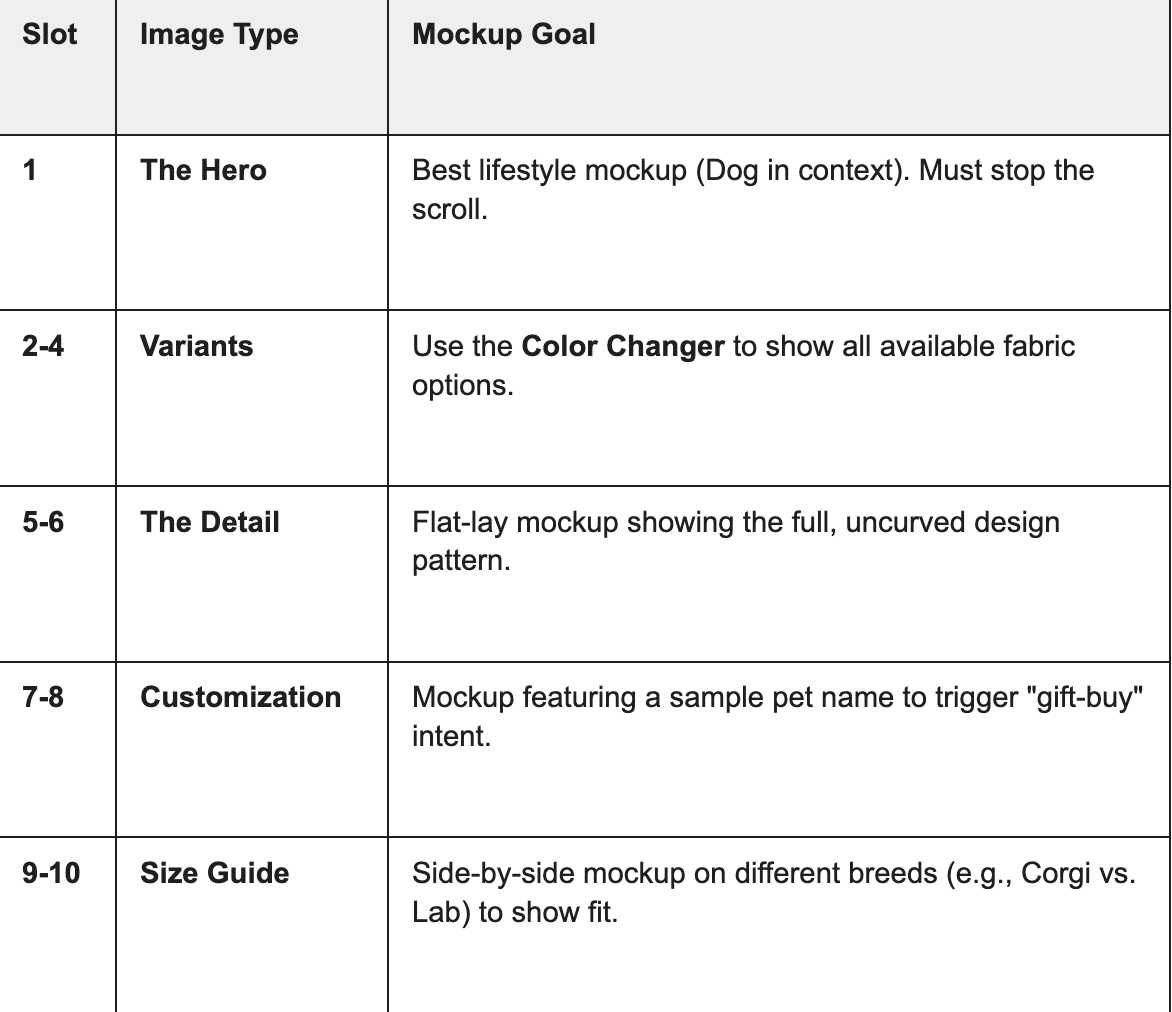
2. The "Perfect 10" Image Gallery Strategy
Use your mockups to answer every customer question before they ask it:
3. Visualizing Attributes (Tags & SEO)
Marketplaces like Etsy rely on attributes. Your mockups should act as visual proof for your tags:
- Material: Use high-res mockups to show the "weave" (Cotton vs. Polyester).
- Theme: Match the background context to the theme (e.g., a snowy park for a Christmas-themed bandana).
- Pet Type: If it fits cats too, include a feline mockup to expand your market reach.
Tutorial: Launching Your Pet Bandana Line in 4 Simple Steps
Stop wasting time on manual warping. Here is how to use Mockuplabs to generate a full product gallery in under 5 minutes:
Step 1: Upload & Auto-Detect (The "Any Image" Advantage)
Upload a photo of your blank bandana (your own product, or a reference image from your supplier). Click the "Mockup" button. In a few seconds, our tool analyzes the fabric's geometry and generates an editable mockup with realistic shadows and drape.
Step 2: Drag, Drop & Warp
Drop your design PNG onto the canvas. The model automatically warps the graphic to follow the bandana's curves and folds. Use the handles to resize or rotate, and watch the design integrate into the fabric texture in real-time.
Step 3: Precision Refinement (Area Selection & Color)
- Area Selection: Use this tool to "paint" exactly where you want the design to show, ensuring it perfectly fits the visible triangular section.
- 1-Click Color Changer: Pick a new color (or input hex code). See the mockup update in real time—colors, shadows, and highlights all adjust automatically.
Step 4: High-Res Export & AI Video Magic
Download your watermark-free static images for pro listings, or use our Image-to-Video engine to instantly transform your mockup into a realistic, scroll-stopping TikTok or Etsy listing video.
Conclusion: From Design to Viral Content
Whether you are targeting professional groomers or emotional gift-buyers, your mockup is your most powerful sales tool. By combining 4K photorealistic images with AI-generated video, Mockuplabs.ai turns your designs into a complete multi-platform marketing engine. Don't just show them a pattern—show them their pet’s next favorite accessory in motion.
FAQs: Pet Bandana Mockups
Q: What's the best image format for pet bandana mockups?
PNG with a transparent background is ideal. This allows you to place the bandana on any background (dog photo, solid color, lifestyle scene) without edge artifacts. JPG also works but is less flexible if you later want to change the background.
Q: Can I use AI-generated dog images in my mockups?
Yes. In fact, AI dog images are increasingly realistic. They're indistinguishable from real dogs to most buyers.
- The main advantage: consistency (you control the breed, color, pose) and speed (no photoshoots).
- The main disadvantage: some buyers prefer real dogs; use real dog mockups as primary, AI as secondary.
Q: Can I sell the same design across multiple sizes and colors?
Yes, absolutely. This is where mockups shine. Create a base design, generate color and size variations instantly, and list them as separate SKUs. Buyers search for specific colors, so having distinct SKU listings for each color-size combo boosts discoverability.
Q: What is the best tool for fast product color variants?
For 2026 sellers, the best tool is a dynamic color changer that preserves lighting. Unlike static templates, Mockuplabs’ Color Changer allows you to input any hex code and watch the highlights and shadows adapt in real-time. This is the fastest way to generate an entire 10-color SKU set without re-uploading your artwork.