Mockuplabs is an ecommerce design platform for creating personalized product visuals. It helps sellers and designers turn real product photos into reusable design assets, then use precise editing tools, batch processing, and the AI Design Agent to create content for product listings and marketing.
Built for print-on-demand (POD) and ecommerce sellers and designers, the platform brings together tools for creating editable mockups from product photos, recoloring products, producing images in batches, and exploring AI-assisted design. Results appear on the same infinite canvas, where you can continue editing and refining them. Mockuplabs also offers a free mockup library with more than 30,000 templates.
For POD businesses, you can turn your own product photos into editable mockups, swap artwork and colors, and create product images in batches. You can then use those assets to build listing image sets, lifestyle scenes, advertising posters, and videos.
For broader ecommerce projects, you can describe a complete task to AI Design Agent, the platform's AI design agent. It can create main product images, coordinated image sets, and visuals for A+ Content and product detail pages, or use product images already on the canvas to create marketing designs.
From editing a single product photo to building a collection of product visuals and preparing launch materials, Mockuplabs connects these tasks in one platform.
What Problems Does Mockuplabs Help Solve?
Two types of work are especially common and time-consuming in ecommerce design.
The first is accurately presenting products and personalized designs. Artwork needs to appear on the product you actually sell, at the right size and in the right position. Different colors, styles, and personalized variations also need their own images.
The second is creating content around those products over time. A launch needs main images and detail shots. Promotion calls for lifestyle scenes, ads, and posters. The same products often need new designs for different uses.
Mockuplabs addresses these needs through two groups of tools:
Feature Area | Main Users | Main Uses |
|---|---|---|
Mockup editing and design tools | POD designers and sellers | Create product mockups, color options, product variant images, listing images, and marketing assets. |
Ecommerce design and AI creative tools | Ecommerce designers and sellers | Edit real product photos; create coordinated product image sets, visuals for A+ Content and product detail pages, advertising posters, and videos; and complete full design tasks with an AI agent. |
These tools can work together. Finished mockups and product images can stay on the canvas and become the starting point for product page content and marketing designs.
1. Mockup Editing Tools: Show Your Designs on Real Products
Print-on-demand, or POD, typically involves applying artwork, text, or personalized content to a base product. The same T-shirt, hoodie, or tote bag can appeal to different audiences with different designs and colors.
Creating a product image involves more than the artwork itself. You also need to consider its position, size, and fit on the product, as well as how to produce multiple versions efficiently.
Mockuplabs provides mockup editing tools for these tasks.
Turn Product Photos into Editable Mockups
Ready-made mockups are convenient, but they may not match the products you sell. Differences in fit, necklines, pockets, materials, or accessories can affect the result.
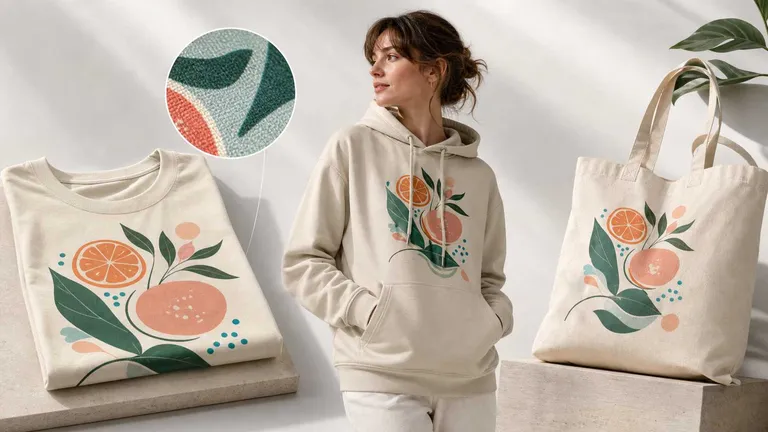
With Product Mockup Generator, you can use your own product photos to create editable mockups, then apply artwork, logos, or text.
While editing, you can see how the design works with the original photo's perspective, curves, folds, and lighting, and adjust the placement area as needed.
You can also reuse the same product setup for new designs and colors, reducing the need to edit the original photo again.
This is especially useful for private-label products, styles from third-party suppliers, and unusual products that are difficult to match with an existing mockup template.
Edit Mockups in Real Time
It is often easier to judge a design or color combination when you see it on a product.
Mockuplabs supports real-time mockup editing so you can replace artwork, adjust colors, and compare options with fewer rounds of production and review.
POD sellers can edit directly on a mockup's detail page to create main product images and marketing assets. Designers can also use the canvas to continue working on different versions of the same product.
Recolor Products and Compare Color Options
When a product comes in several colors, you may not have a complete set of photos for every option.
The product color changer lets you adjust the color of selected product areas while accounting for the original photo's light, shadows, folds, and material appearance.
You can compare color combinations or create images of colors you actually offer for sale. For personalized orders, you can also show a customer's logo or artwork against the product's base color to review the complete design.
Use Batch Mockup and Batch Recolor to Reduce Repetitive Work
Applying one design to several products, or showing one product in multiple designs and colors, can take considerable time when done image by image.
Mockuplabs offers two batch tools:
- Batch Mockup: Create product images in batches using your product photos and design assets.
- Batch Recolor: Create images of multiple color options using your product photos and chosen colors.
Choose the product, artwork, and color combinations you need to reduce repeated placement, recoloring, and individual image editing.
These tasks have clear inputs: which product photo to use, which design to apply, and which color to show. Precise editing and batch processing let you make those changes without generating an entirely new image each time.
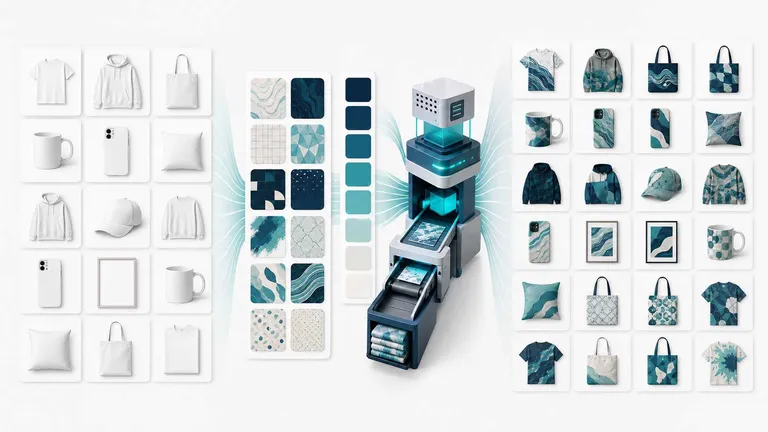
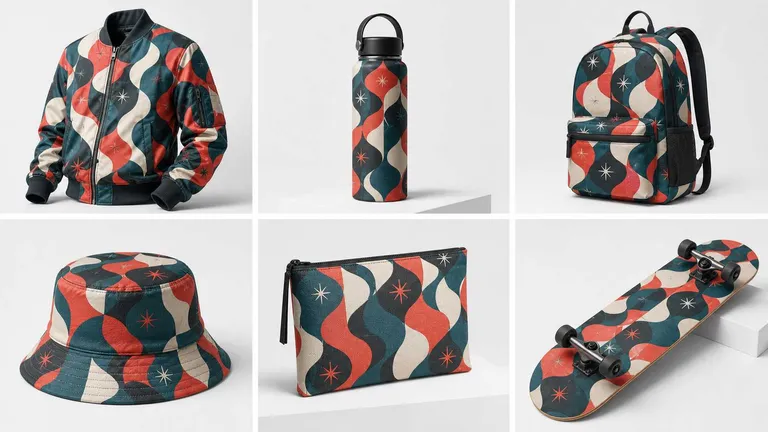
Preview All-Over-Print Designs
An all-over-print design involves more than the pattern itself. Its scale, arrangement, direction, and overall color scheme all affect how it looks on the product.
Mockuplabs' all-over-print (AOP) tools support pattern and color previews for clothing, home goods, and other products with large printed areas.
Designers can compare visual options before creating product images. Production details such as pattern pieces, seams, and print alignment still need to be checked against the supplier's requirements.
Create a Coordinated Set of Listing Images
A product listing usually needs more than a single mockup. It may require a main image, color options, close-up details, lifestyle scenes, and graphics explaining product information.
The Product Listing Image Generator helps you create a coordinated set of images around one product, reducing separate production and repeated organization.
Each image can serve a different purpose. The main image shows the product and design. Detail shots explain specific features. Lifestyle images show the product in context. Informational graphics communicate confirmed specifications or personalization options.
For POD sellers, the focus is on preparing main images and marketing materials more quickly. For POD designers, it is also about producing listing images, SKU visuals, and different promotional versions over time.
2. Ecommerce Design and AI Creative Tools: Build Complete Content Sets
Prepared product photos can also be used on product pages, in ads, on social media, and in promotional campaigns.
Mockuplabs brings its infinite canvas, product image editing, AI creative tools, and AI Design Agent together so you can keep working with existing assets and reduce repeated importing, organizing, and production.
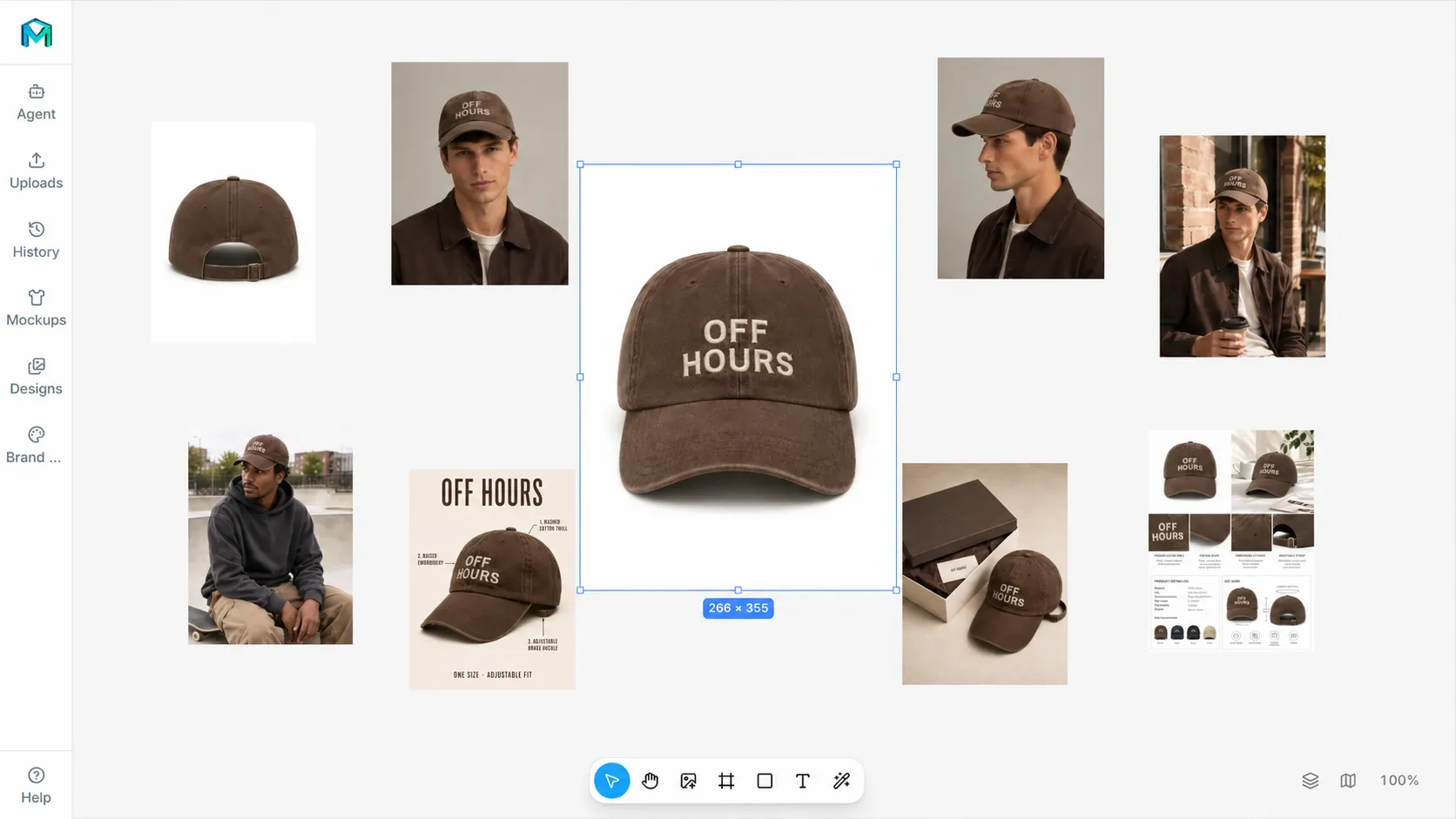
Organize Assets and Design Options on an Infinite Canvas
The infinite canvas gives you a shared workspace for product photos, artwork, color options, and finished images. You can compare versions and continue editing and designing.
For example, you can finish a set of product images, then build listing content and campaign materials around them. Product editing and later design work can happen in the same workspace, reducing the need to switch between separate tools.
Designers can work on multiple options together, while sellers can keep creating content for the same group of products.
Use AI Design Agent for Ecommerce and Marketing Tasks
AI Design Agent is Mockuplabs' AI design agent. It can create product visuals from your instructions and use existing canvas assets to produce marketing designs.
It supports complete design tasks as well as individual images. Examples include preparing a listing image set for a product or turning existing product images into a collection of promotional assets.
AI Design Agent covers two main areas.
Product Image Sets and Ecommerce Content
Describe your product and requirements to create coordinated image sets, color variant images, secondary listing images, detail graphics, and A+ Content assets, with designs organized around the content requirements of different ecommerce platforms.
Explain the product, its intended use, and the types of images you need. For example:
Create a set of images for this product, including a main image, color options, close-up details, and lifestyle scenes. Use the product information provided. Do not add unconfirmed specifications or selling points.
This task involves both individual image design and the way the set works together: which images show the product, which explain details, and which add context.
Marketing Designs from Existing Product Assets
AI Design Agent can use ecommerce images on the infinite canvas to create marketing graphics, ads, and promotional posters.
Once your product images are ready, you can give it a follow-up task:
Use this set of product images on the canvas to design a summer sale poster. Use a fresh color palette and highlight the supplied campaign headline and offer details.
Existing product assets can then support new launches, seasonal campaigns, and sales promotions, reducing the work of finding images, moving files, and laying out each design separately.
Combine AI Design Agent with Manual Editing
Choose the approach that fits the task:
Task | Suitable Approach |
|---|---|
Replace artwork, adjust colors, or check a specific visual result | Use the mockup and product editing tools directly. |
Repeat the same operation across multiple images | Use Batch Mockup or Batch Recolor. |
Combine assets, compare options, or adjust layouts | Use the infinite canvas. |
Create a complete product content set or marketing design | Describe the full task to AI Design Agent. |
Explore scenes, motion, or creative directions | Use the AI image and video tools, or ask the agent to organize the design work. |
You can first use the editing tools to confirm how a product looks, then ask the agent to build on those assets. You can also start with an agent-generated concept and continue refining it with the canvas and editing tools.
Create Lifestyle Visuals for A+ Content and Product Detail Pages
Some images need to show the product clearly. Others help shoppers understand where and how it fits into their lives.
The tools for A+ Content and product detail page scenes let you explore backgrounds, use cases, and marketing themes for product descriptions, social media, and advertising.
A scene can communicate product style, a practical use, or a gifting occasion. After generation, check the product's structure, artwork, and proportions to make sure the visual matches the item you sell.
Turn Product Images into Videos
The AI Image to Video Generator turns static product images into moving visuals, adding another format for product presentations and marketing.
Together with the platform's image editing and AI creative tools, it gives you different ways to approach a task: editing tools for specific changes, batch processing for repetitive work, and AI generation for exploring scenes and creative ideas.
For workflows by role or sales channel, explore the ecommerce use cases.
How to Get Started with Mockuplabs
You do not need to try every feature at once. Choose a product you plan to list or promote and complete one specific task. This makes it easier to judge how the tools fit your workflow.
Step 1: Prepare Your Product Photos and Design Assets
Choose photos of the product you actually sell, along with the artwork, text, or logos you want to use.
For informational graphics or marketing materials, also prepare confirmed product specifications, campaign copy, and any other required information.
Step 2: Choose Your Working Method
Use the editing tools when you need to replace artwork or adjust colors.
Use batch tools when you need several product or design versions.
For a complete product image set or marketing design, give AI Design Agent the full brief.
Step 3: Approve One Version Before Making More
Check artwork placement, proportions, colors, and product details before creating additional combinations.
For coordinated image sets and marketing tasks, confirm the content and visual direction first so you can avoid repeated revisions across multiple designs.
Step 4: Review the Results Before Publishing
Check product consistency, artwork and text accuracy, factual information, image dimensions, and the target platform's content requirements.
Whether you work manually or use the agent, make your instructions specific: what to create, where it will be used, which assets to use, which text must appear, and which product details must stay the same.
Example: Prepare Listing and Marketing Assets for a Personalized Product Launch
Suppose you are launching a tote bag collection. You already have product photos, several designs, and two colors that are available for sale. You could work through the project as follows:
- Create a mockup from a real product photo and confirm the artwork's placement and appearance on the bag.
- Compare artwork and base colors, then choose the combinations you want to sell.
- Use batch tools to produce product images with less repeated placement and recoloring.
- Create a listing image set with design details, color information, and lifestyle scenes.
- Ask AI Design Agent to use existing product images for launch posters, ads, or social media content.
- Check content, specifications, and dimensions for each use. Confirm the product, copy, and campaign details before publishing.
The goal is to keep using approved product and design assets, reducing the need to start from scratch at each stage.
Frequently Asked Questions
What Is Mockuplabs?
Mockuplabs is an ecommerce design platform for personalized product visuals. You can describe a design task to its AI agent, which can produce designs in minutes and place the results on the same infinite canvas. Editing tools let you continue making precise adjustments to prepare visuals for product listings.
The platform supports AI-assisted creation and precise editing based on real product photos, as well as product image sets, A+ Content and product detail page visuals, advertising posters, and videos.
Where Is Mockuplabs Based?
Mockuplabs is an AI company based in Singapore. Its company name is MOCKUPLABS AI PTE. LTD.
Is Mockuplabs Free?
Mockuplabs offers Free and Pro plans. You can start with the free plan and choose a plan based on the features and usage you need.
Generation tasks use credits. Check the pricing and plan details for current features, credit allowances, and prices.
Which AI Models Does Mockuplabs Support?
Mockuplabs integrates image and video models from several providers. AI Design Agent can automatically select among more than 30 models according to the task.
The AI Product Image Generator includes image options such as GPT Image 2, GPT Image 2.5 Flare, GPT Image 2.5 Sunburst, Nano Banana 2, and Nano Banana Pro.
For video, Sora 2 and Sora 2 Pro are Premium options in Video Generator. Other supported models include Seedance 2.0, Kling, and Veo. Check the model panel in the product for the complete current list.
Do I Have to Use Existing Mockup Templates?
No. Product Mockup Generator lets you turn your own product photos into editable mockups. This is useful for your own styles, supplier products, and unusual items that do not match standard templates.
Is Mockuplabs Only for Print-on-Demand?
No. POD is a major use case, but other ecommerce sellers and designers can also use Mockuplabs to edit product photos and create main and secondary listing images, lifestyle scenes, listing image sets, A+ Content and product detail page visuals, and advertising posters.
How Is AI Design Agent Different from a Standard AI Image Generator?
Single-image generation focuses on producing an individual image. AI Design Agent works with complete design tasks.
Describe the product, intended use, image types, and copy you need. The agent can create a coordinated product image set or use product images on the canvas to build marketing designs, without requiring you to turn every image into a separate task.
Do I Still Need to Use Editing Tools with AI Design Agent?
Choose according to the task. For specific artwork replacements, color adjustments, and visual checks, you can use the editing tools directly. For complete content sets and marketing designs, you can use the agent.
You still need to confirm product information, choose the designs you want, and review the final results before publishing.
Spend Less Time on Repetitive Design Work
For POD designers and sellers, Mockuplabs helps present designs on the products they actually sell and handle variations in artwork, style, and color. For ecommerce designers and sellers, it also connects product image editing, lifestyle content, and marketing design to support listings and ongoing promotion.
Starting with a product photo, you can create an editable mockup, produce images in different designs and colors, and reuse those assets in listing image sets, ads, and promotional posters. Approved product and design assets remain useful for later work, reducing repeated editing and giving each project a starting point for the next.
Mockuplabs combines editing based on real products, batch production, an infinite canvas, and AI Design Agent. You can make precise adjustments yourself or describe a complete task to the agent, then refine the results on the canvas. The aim is to reduce repetitive operations and make room for creative work and selling.